Model types
EventStorming
EventStorming is a workshop format for exploring a business domain quickly, with everyone in the room. It is usually the first model a team makes: you lay out what happens in the business, in order, and the boundaries reveal themselves.
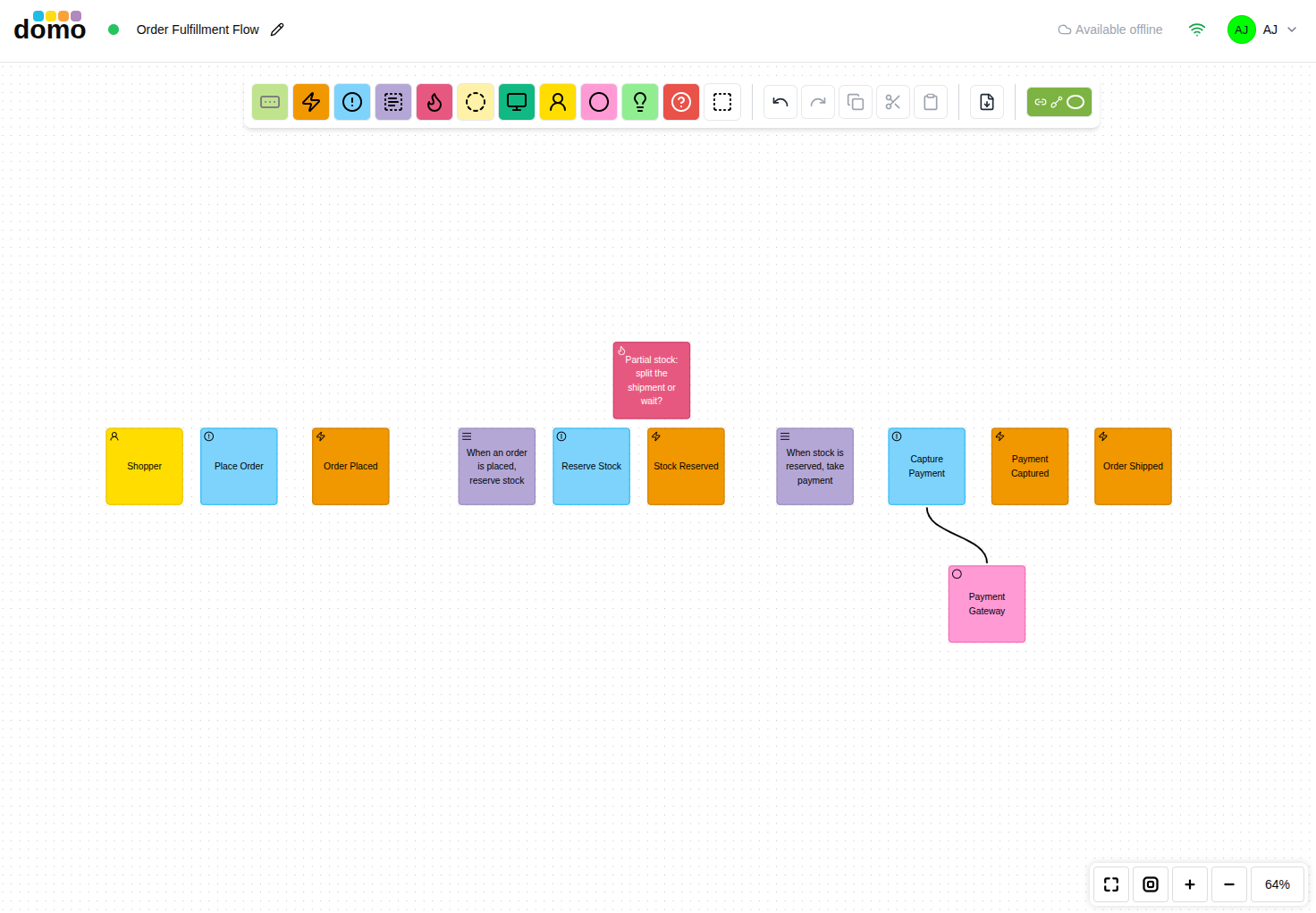
The elements
| Element | Symbol | What it is |
|---|---|---|
| Domain Event |  |
Something that happened that the business cares about. Written in the past tense: Order Placed. |
| Command |  |
An action someone or something takes that causes an event. |
| Policy |  |
A rule that reacts to an event: whenever this happens, do that. |
| Saga / Process |  |
A longer-running process coordinating several steps. |
| Hotspot |  |
Conflict, confusion, or an unanswered question. Put them up early and often. |
| Entity |  |
Something with an identity that changes over time. |
| Domain Service |  |
Domain behavior that does not belong to a single entity. |
| Value Object |  |
A value with no identity of its own. |
| View |  |
Information someone reads to make a decision. |
| User Role |  |
The kind of person doing the work. |
| External System |  |
A system that is an outside influence. |
| Opportunity |  |
Something worth pursuing; a competitive advantage is attainable. |
| Problem |  |
Something troublesome is in the way. |
| User Interface |  |
A screen or interaction surface. |
| Query |  |
A question asked of the system. |
| Note |  |
Anything else worth writing down. |
| Subdomain |  |
A container that groups elements into a candidate boundary. |
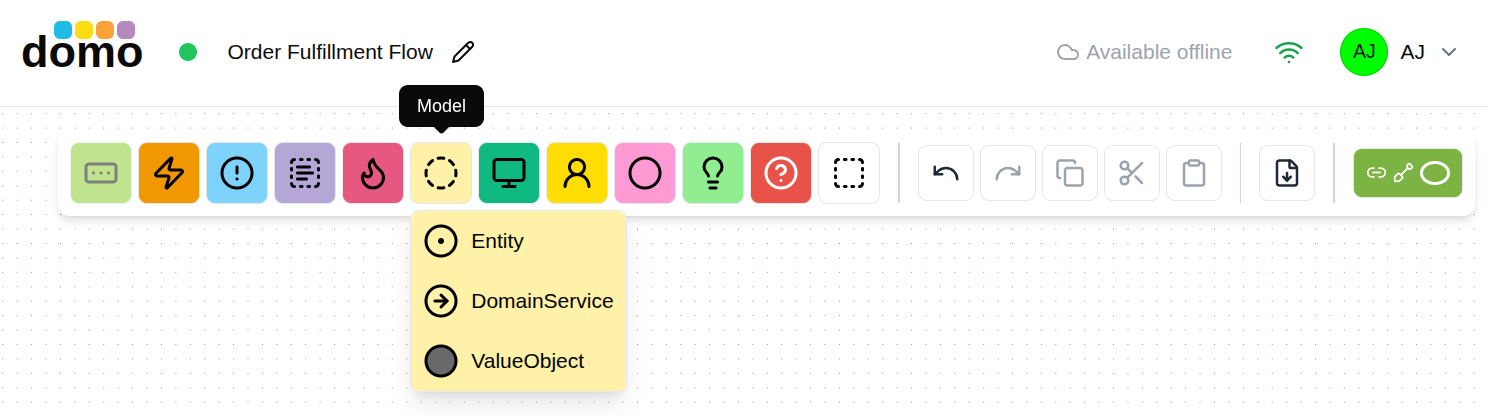
The toolbar groups the smaller ones: Control holds Policy and Saga, Model holds Entity, Domain Service, and Value Object, and Extra holds User Interface, Query, and Note.
How a session usually goes
- Events first. Fill the canvas with domain events, past tense, roughly left to right in time. Do not worry about order or duplicates yet.
- Sometimes the "Why?" is helpful. You may need to introduce a policy to explain why something happens. There are also times when you can challenge the assumption that an event occurs by asking: Really? Always? How often? Who or what causes this? Does it repeat? Those and similar questions can help in discovery, clear up ambiguities, and save the team from general missteps.
- Sort into a timeline. Drag them into sequence. Disagreements about order are the useful part.
- Don't be duped by duplicates. Sometimes similar things happen in different places. Two or more people might refer to those occurrences by the same name, but they are actually different happenings. If some are actually duplicates, toss them.
- Add the causes. You can place a command in front of events that happen due to an imperative, but that tends to happen as big-picture is fine-tuned to design-level models. If it helps to show what triggers an event, do so.
- Who made it happen? Even when the command that causes an event is obvious (and this redundant at the high level) calling out the user role or external system that leads to the event may be vital. If the who or what actually does send a command, show both, with the user role or external system first, the command following it, and then event.
- Add the reactions. Where an event causes something else, name the policy between them: it's a decision point that has some rules and/or constraints that must be captured.
- Mark the hotspots. Every "it depends," every argument, every unknown gets a hotspot.
- Find the boundaries. Group related elements and see the shape of the subdomains.
And in general, don't get wrapped around the axle of agreement and getting ahead of yourselves. Sometimes the group of collaborators simply won't have the answers and trying to make decisions without the right people involved will prove to be futile. Those are huge time sinks that most often lead to wrong decisions. Slap down a policy or hotspot with an explicit call out to the issue. Perhaps you can even name to person or the role you need to seek out for answers. After that, move on with what you do know and can discover with your current group.
Everything else...
There are other modeling elements that can be applied when it's helpful to do so. Some of them will tend to be used as the model transitions from big-picture to design-level. This list explains the tools.
- Entities capture data and behavior. Sometimes non-technical collaborators will understand what an entity is. Others will just want to think of "that yellow thingy" as "data."
- Views provide the result of a query for system state. It's essentially the data users and software components must obtain to make a decision.
- If a given query is non-obvious or requires special criteria, capture it.
- The same goes for particular user interface components. Don't risk forgetting an ah-ha! moment.
- As details emerge, value objects and domain services can help define just the essentials.
- Opportunities show where discoveries are made that lead to realizing monetary gain or that another kind of competitive advantage can be attained.
- Problems can be used to mark the there-be-dragons areas that are showstoppers—those we-can't-get-there-from-here realizations—that are even more troublesome than hotspots generally deal with. (Hopefully there aren't many.)
Grouping into subdomains
Select the elements that belong together and press the Subdomain button (or D). They are wrapped in a
named container. The button is only enabled when the selection can legally be grouped. Elements that are
already inside a subdomain, and subdomains themselves, cannot be re-grouped.
Subdomains are what a Context Map is generated from, so this step is what carries the workshop forward.
Keyboard
| Key | Element |
|---|---|
E |
Domain Event |
C |
Command |
P |
Policy |
G |
Saga / Process |
H |
Hotspot |
N |
Entity |
V |
View |
U |
User Role |
S |
External System |
O |
Opportunity |
? |
Problem |
I |
User Interface |
T |
Note |
D |
Group selection in a Subdomain |
Generating a Context Map
Once the subdomains are drawn, create a Context Map from this model and each subdomain arrives as a bounded context, bringing its elements with it. Choose auto sync while the EventStorming model is still moving, and switch to manual once the Context Map is being shaped by hand. See Linked models.