Model types
Domain Model
A Domain Model is the tactical view: what is actually inside a bounded context. Aggregates and their entities, the value objects they are made of, the services, repositories, and factories around them, and the commands and events that move them.
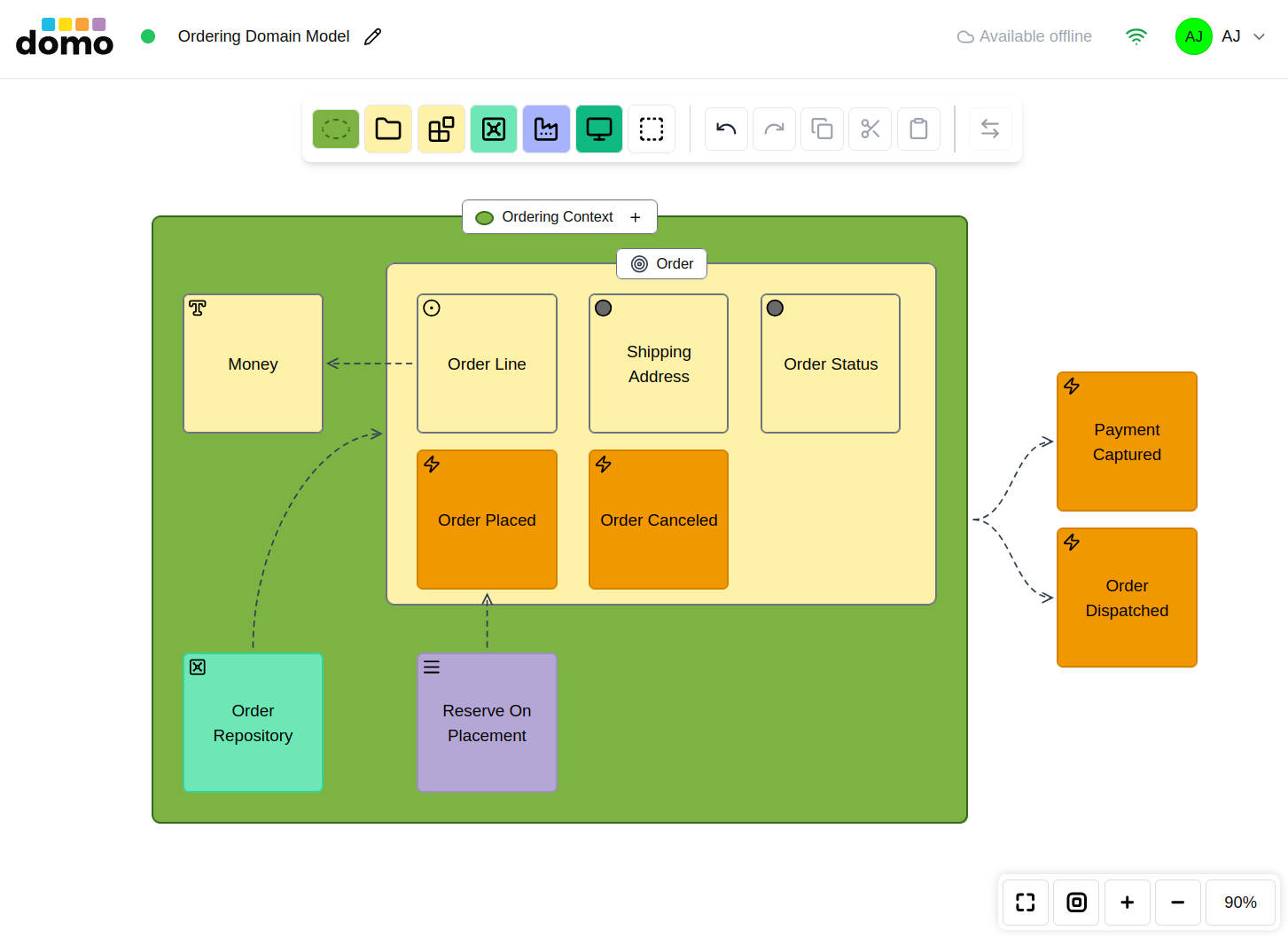
The elements
The toolbar reads left to right from the largest container to the smallest detail.
Context (dropdown) holds Bounded Context, Big Ball of Mud, Bubble Context, and Interchange Context. This is the boundary the model lives in.
Module: a named grouping inside the boundary.
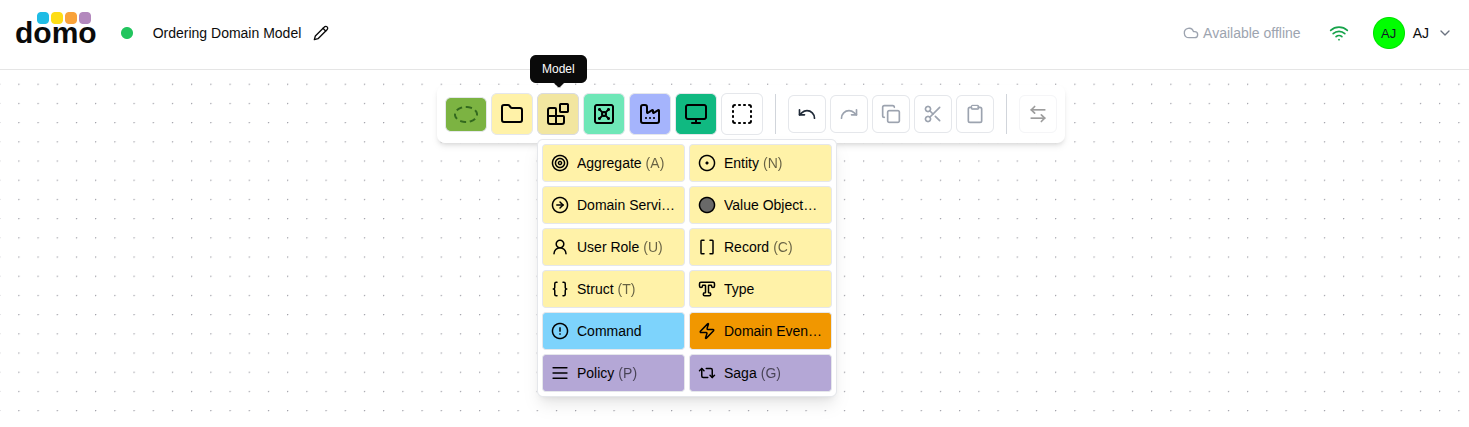
Model (dropdown, two columns) holds the tactical types:
| Element | Symbol | What it is |
|---|---|---|
| Aggregate |  |
A consistency boundary. The node is the aggregate root. |
| Entity |  |
Something with an identity that persists through change. |
| Value Object |  |
An immutable value with no identity. |
| Domain Service |  |
Domain behavior that belongs to no single entity. |
| User Role |  |
The kind of actor involved. |
| Record |  |
Data shape: columns. |
| Struct |  |
Data shape: attributes; possibly nested. |
| Type |  |
Data abstraction. |
| Command |  |
A request for the model to do something. |
| Domain Event |  |
Something the model decided has happened. |
| Policy |  |
A rule that reacts to an event. |
| Saga |  |
A long-running coordination across steps. |
Repository and Factory have their own buttons, next to the Model dropdown.
View: a read model.
Extra (dropdown) holds User Interface, Query, and Note.
Common Properties
All model elements rendered in graphical form have properties. The properties can be set by using the Properties dialog box. Hovering your mouse pointer over an element, you'll see a table/grid icon. Click the icon and the properties dialog box will appear.
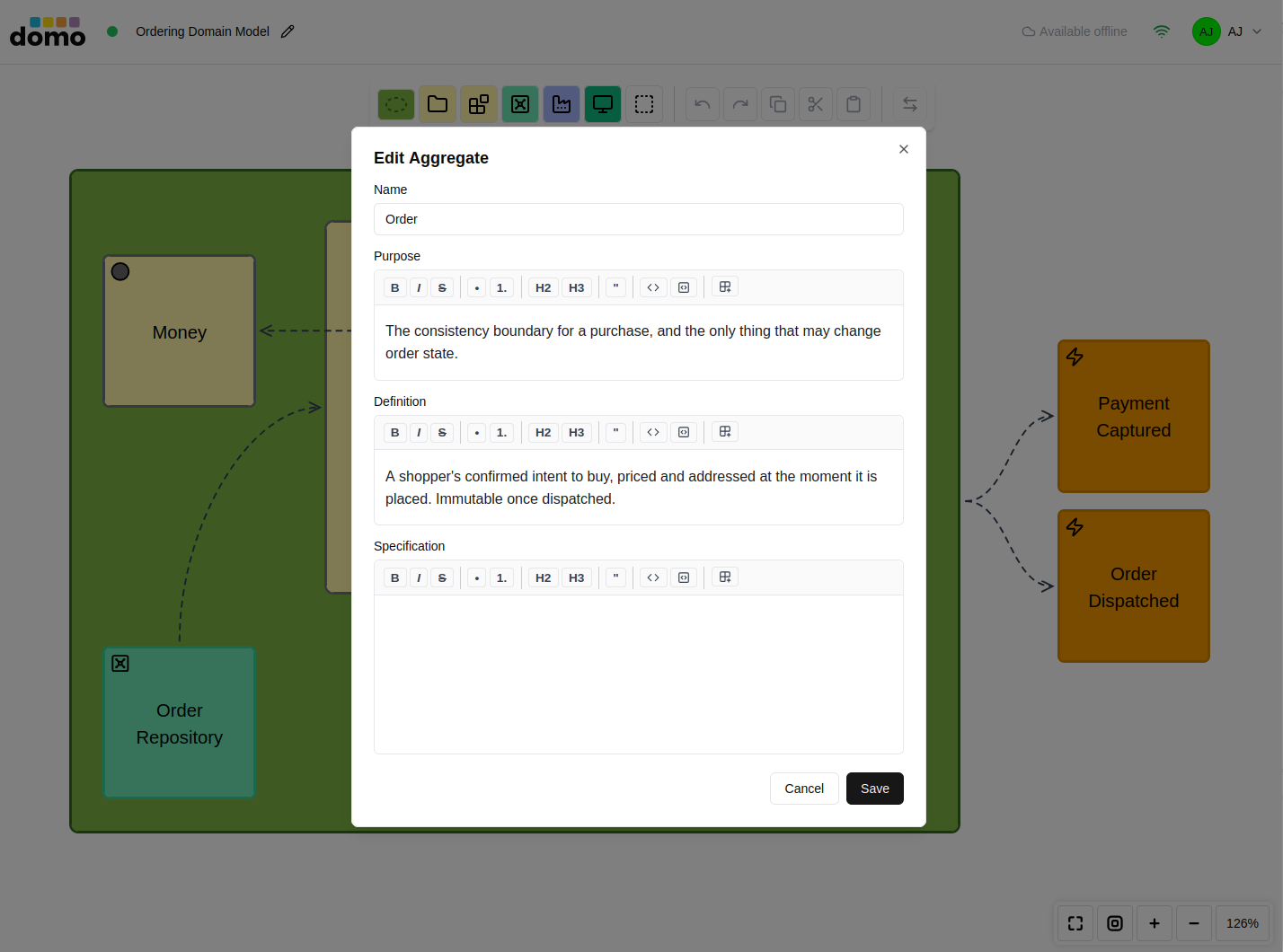
Enter pertinent descriptions for Purpose, Definition, and Specifications. The Specifications can include source code snippets formatted as markdown codeblocks.
Note: When naming a model element, use PascalCase, as you would when naming a class or other first-class type. The editors intelligently adjust the text at rest automatically for readability, inserting a space between each word. So the format is both highly readable and lines break naturally on word boundaries. For example, if you name a type
OrderLine, the editor will display the text asOrder Line.
These properties play an important role in defining the ubiquitous language for a given Bounded Context, where the Bounded Context is the focus of a Domain Model. The Glossary is used to summarize all of the definitions in a Domain Model, displaying a full ubiquitous language. They can also be used by the CodeUp! source code implementation and review tool.
Note: Context Map, C4, and Hexagonal elements have their own (non-common) properties dialog boxes suited to what those elements are.
How aggregates behave
The aggregate is the element most often misused, so DomoModeler is opinionated about it:
- The aggregate element is the aggregate root entity. There is no separate "root entity" element. You name the aggregate element for the concept it represents, and that is its root.
- It is a superset of an entity. Everything an entity has, an aggregate has, plus composition containment.
- Reference other aggregates by their root. You can draw the reference to the other aggregate, never into its insides. Although this is supported by both in the pattern definition and the model editor, it is not recommended as a contemporary practice for several reasons. Reference by aggregate identity instead.
- Composition means lifecycle. Deleting an aggregate deletes what it contains.
- It contains entities, value objects, and policies only. A policy goes inside when its rule pertains specifically to that aggregate. A domain service is never a child of an aggregate. The relationship between them is a dependency, drawn as a connection.
Keyboard
| Key | Element | Key | Element |
|---|---|---|---|
A |
Aggregate | E |
Domain Event |
N |
Entity | P |
Policy |
O |
Value Object | G |
Saga |
R |
Domain Service | Y |
Repository |
M |
Module | F |
Factory |
C |
Record | V |
View |
T |
Struct | U |
User Role |
I |
User Interface | Q |
Query |
Syncing with the Context Map
A Domain Model created from a bounded context keeps a link back to its Context Map. The Sync with Context Map button in the toolbar opens a review of what this model would contribute back, which is its commands, events, and policies joining the bounded context's behavior model. The strategic view therefore stays honest as the tactical design develops, and nothing is pushed without you seeing it first.
Generating a Glossary
Point a Glossary at a Domain Model and it builds a definition table from the model's elements (name, type, and description) that you can then edit and export.